

Why Is My EV Charging So Slowly at Home? Common Causes and Fixes
Oct 29,2026
Home EV charging that feels too slow is frustrating. The wallbox may advertise a high rating, yet the car gains range far more slowly than expected. At Parwatt I see this happen when the circuit, the charger settings or the vehicle itself limit the power long before the nameplate figure is reached.
Slow home charging is usually caused by the lowest limit in the chain: the household circuit, the charger’s configured current or the vehicle’s onboard AC charger. Schedules, load management, battery temperature and a high state of charge can reduce the rate further. Persistent heat, trips or errors need professional inspection.
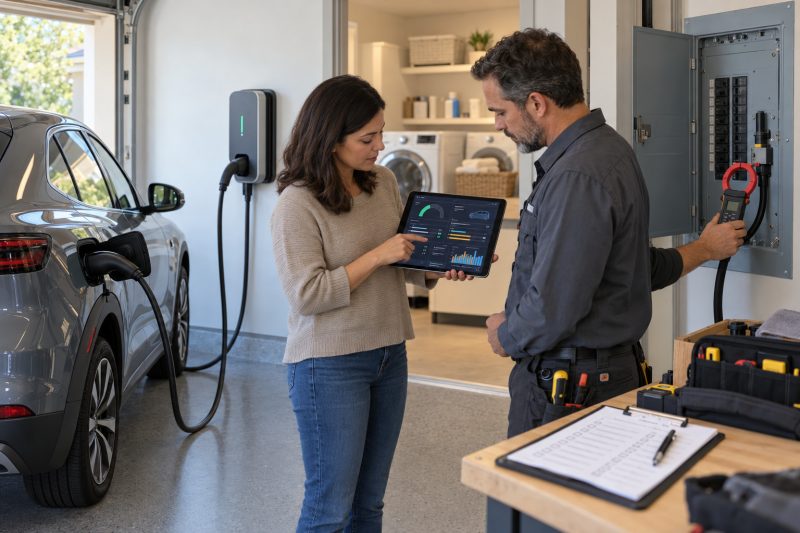
I have worked with residential installers, fleet managers and home EV users for years as general manager at Parwatt New Energy. We supply EV charging equipment and power modules used in home and commercial projects. I regularly help owners diagnose why a Level 2 session delivers less power than the brochure suggests. Our guidance for products in the EV Charger Category always starts with the real limits of the circuit, the vehicle and the configured settings. In this article I explain the common causes of slow home EV charging and how to restore normal speed in 2026.
Why Your Home EV Charger May Deliver Less Power Than Advertised?
The number on the charger is a maximum capability. Actual power is set by the weakest link among the household circuit, the charger’s present current setting and the vehicle’s onboard AC acceptance. If any one of those limits is lower, the session runs at the lower rate.
A home EV charger may deliver less power than advertised because circuit capacity, installation settings and the vehicle’s onboard AC limit all sit below the nameplate rating. The usable rate cannot exceed the lowest of those three.
How the Limits Stack
I have measured sessions where an 11 kW wallbox delivered only about 7 kW. The vehicle’s maximum AC input was the limiting factor. The charger was working correctly; the car simply could not request more.
In other homes the circuit was the bottleneck. A continuous-load rule or a load-management setting reduced current so the main service would not overload. The display showed a lower kilowatt figure than the hardware could theoretically provide.
Voltage and phase also matter. Single-phase supplies and lower line voltage reduce power for a given current. Three-phase installations can reach higher totals when the vehicle supports them.
Configuration choices inside the charger or the vehicle app can lock the current to a fraction of the hardware rating. A deliberate 16 A or 24 A setting on a 40 A-capable unit produces a slow session that looks like a fault until the setting is checked.
Here is a table of the main limiting factors:
| Limit Source | Typical Effect | What You See |
|---|---|---|
| Vehicle onboard AC max | Caps power regardless of wallbox | Stable but lower than charger rating |
| Circuit continuous rating | Protects wiring and panel | Current held below breaker size |
| Charger current setting | Software or DIP limit | App or display shows reduced amps |
| Load management | Temporary reduction | Rate rises when house load falls |
| Voltage / phase | Lower power for same current | kW below simple amps × volts expectation |
This table reflects the hierarchy I explain to owners of equipment from the EV Charger Category.
In 2026 the first diagnostic step is still to identify which link is the lowest. Everything else follows from that.
The Charging-Speed Mistakes EV Owners Commonly Make
Owners often confuse kilowatts with kilowatt-hours, calculate time from the charger’s maximum rating alone, ignore single-phase versus three-phase differences, and treat the natural slowdown near a full battery as a defect. These mistakes create false expectations and unnecessary service calls.
Common mistakes include mixing up kW and kWh, using the charger’s maximum rating to predict time, overlooking phase and voltage limits, and assuming taper near full charge is a fault.
Mistakes That Hide the Real Cause
One frequent mistake is reading the battery size in kWh and the charger rating in kW and then expecting a linear result without checking the vehicle’s AC limit. A 60 kWh battery on an 11 kW wallbox does not charge at 11 kW if the car only accepts 7 kW.
Another mistake is treating the advertised power as continuous delivered power. Installation current limits, load management and vehicle requests all reduce the average rate. The session then takes longer than the simple division suggests.
Phase confusion is common in markets that use both single-phase and three-phase residential supplies. An 11 kW three-phase figure is not available on a single-phase circuit of normal domestic size.
Near the end of charge the battery management system reduces current. Owners sometimes interpret this taper as a failing wallbox. In most cases it is normal protective behaviour.
Some drivers also overlook scheduled charging or a reduced daily limit. The car may be waiting for a cheaper tariff window or stopping at 80 percent by design. The hardware is not slow; the instructions given to it are restrictive.
Here is a table of frequent mistakes:
| Mistake | Why It Misleads | Better Check |
|---|---|---|
| Charger kW = session kW | Vehicle or circuit may be lower | Read live power on car or app |
| Ignore phase / voltage | Power formula changes | Confirm supply type |
| Taper = fault | Normal near full or high temperature | Note SOC and battery temp |
| Schedule overlooked | Session delayed or capped | Review vehicle and charger timers |
| kWh / kW without limits | Ideal time is too optimistic | Use effective power after limits |
This table keeps diagnosis grounded. At Parwatt we encourage owners to record live kilowatts before assuming hardware failure on products related to the FES-D30 DC EV Charger or residential AC units.
I advise taking one screenshot of the live charging power and the vehicle’s AC limit. Those two numbers eliminate many misunderstandings.
How to Identify What Is Limiting Your Home Charging Speed
A clear diagnostic order finds the limit quickly. Read the live charging power in kilowatts. Compare it with the vehicle’s maximum AC acceptance. Check the breaker size and any current setting on the charger. Review schedules, load management and battery temperature. The lowest confirmed limit is the one that rules the session.
Identify the limit by comparing live kW with the vehicle AC maximum, the circuit rating and the charger’s configured current, then reviewing schedules, load management and battery temperature.
A Practical Diagnostic Sequence
Start the session and note the stable power in kW on the vehicle screen or the charger app. Do this after the first few minutes so initial handshakes are complete.
Look up the vehicle’s maximum AC charging rate in the manual or the manufacturer’s specification. If live power matches that figure, the wallbox is not the bottleneck.
Check the circuit breaker rating and any continuous-load rule the installer applied. A 40 A continuous limit on a 50 A breaker is common and will hold power below a higher charger rating.
Open the charger configuration. Confirm the present current setting. Many units can be software-limited for panel protection or for quieter operation.
Review both the vehicle and the charger for active schedules or charge-target limits. A session that starts late or stops early is often intentional.
Note battery temperature and state of charge. Very cold or hot batteries, and batteries above roughly 80 percent, often accept less power.
If load management is installed, observe whether house loads such as heating or cooking coincide with the reduced EV rate. The rate should recover when those loads fall.
Here is a diagnostic checklist:
- Live charging power recorded in kW
- Vehicle maximum AC rate confirmed
- Breaker size and continuous limit checked
- Charger current setting inspected
- Schedules and charge targets reviewed
- Battery temperature and SOC noted
- Household load at the same time observed
- Cable and connector condition inspected
- Error messages or fault lights recorded
At Parwatt we use this sequence when supporting residential customers who later expand toward commercial systems built around the 30kW Power Module or 40kW Power Module.
I recommend writing the numbers down in order. The first place where the live kW matches a known limit is usually the answer.
Normal Charging Slowdowns vs. Electrical or Equipment Problems
Some reductions in speed are normal. High state of charge, extreme battery temperature and dynamic load management all lower power by design. Other symptoms point to electrical or equipment problems: repeated interruptions, overheating plugs, burning smells, discoloured outlets or persistent fault messages.
Normal slowdowns include taper near full charge, temperature-related reduction and temporary load-management cuts. Overheating, repeated trips, odours or constant faults require professional attention.
How to Tell the Difference
I have seen many sessions slow sharply above 80 or 90 percent. The battery management system is balancing cells and protecting longevity. Restarting the session rarely restores the earlier rate until the target is raised or the battery moves away from the limit.
Cold-weather starts often show low power until the battery warms. Some vehicles use part of the incoming energy for heating, which makes the range gain look slower even when the electrical supply is stable.
Load management that tracks the main service will cut EV current when the kitchen or HVAC draws hard. The behaviour is intentional. If the rate returns after those loads stop, the system is working as designed.
Abnormal signs look different. A plug or receptacle that is uncomfortable to touch, plastic that has changed colour, or a sharp electrical smell indicates excess resistance or a failing connection. Charging should stop until the joint is inspected.
Repeated breaker trips or residual-current device operations are not normal speed control. They suggest an overloaded circuit, a ground fault or a developing equipment issue.
Error codes that return after a restart, or a session that never exceeds a very low power without a clear setting explaining it, also deserve professional diagnosis.
Here is a comparison of normal versus problem signs:
| Observation | Likely Category | Suggested Response |
|---|---|---|
| Slow above 80–90% SOC | Normal taper | Expected; adjust target if needed |
| Slow when battery is cold | Normal thermal limit | Allow warm-up or precondition |
| Rate drops when house load rises | Load management | Normal if rate recovers later |
| Plug or outlet very hot | Possible connection fault | Stop; inspect immediately |
| Burning smell or discoloration | Electrical problem | Stop; call electrician |
| Repeated trips or persistent errors | Equipment or wiring issue | Professional diagnosis |
This comparison prevents unnecessary panic while still catching real hazards. At Parwatt we stress the same distinction for users of systems in the EV Charger Category.
I advise treating heat, smell and repeated trips as stop signals even if the car still accepts some power.
A Step-by-Step Checklist for Restoring Normal Charging Speed
Restoring normal speed starts with confirmation of specifications and settings, then moves to household load and physical connections, and ends with professional help when the numbers still do not make sense or when safety signs appear.
Restore normal speed by verifying vehicle and charger limits, correcting settings, removing temporary load restrictions, inspecting connections and calling a qualified electrician or service technician when problems persist or safety signs appear.
Actions Owners Can Take in Order
Confirm the vehicle’s maximum AC charging rate from the official specification. Compare it with the live kW you recorded. If they match, the session is already at the vehicle limit.
Open the vehicle charging menu and the charger app. Disable any reduced current limit you do not need, clear an overly early schedule, and raise the charge target if you are stopping early by design.
Reduce competing household loads during a test session. If power rises when the oven, dryer or HVAC stops, load management or simple circuit sharing was the cause.
Inspect the plug, receptacle, cable and vehicle inlet. Look for discoloration, deformation, bent pins or debris. Unplug only when the session is properly ended and the circuit is safe to handle.
Restart the session after the checks. Record the new stable kW. Improvement after a settings change confirms the earlier limit was intentional or misconfigured.
If live power remains far below both the vehicle limit and the expected circuit capacity, or if heat and errors continue, stop using the equipment. Contact the installer or a licensed electrician for measurement of voltage, current and connection integrity.
Keep a short log of date, live kW, SOC, temperature and any message codes. That record speeds professional diagnosis.
Consider whether a future circuit upgrade or a different current setting would better match your daily energy need. The goal is reliable overnight recovery, not the highest possible nameplate number.
Here is a restoration checklist:
- Vehicle AC maximum confirmed against live kW
- Charger and vehicle current settings reviewed
- Schedules and charge targets adjusted
- Household loads reduced for a test session
- Plug, cable and inlet inspected for damage or heat
- Session restarted and new kW recorded
- Persistent gap or safety signs escalated to professional
- Log of readings and codes retained
- Long-term circuit or settings plan considered
- Only certified equipment and qualified labour used for changes
At Parwatt we support this diagnostic path for residential customers. Further reading on charging behaviour is available in our articles on Electric Vehicle Charging and AC vs DC EV Charging. Product options and specifications can be reviewed on our main site and within the EV Charger Category, including higher-power platforms such as the Battery Buffered Ultra Rapid EV Charger.
Owners who follow the checklist usually find a settings or limit explanation. When they do not, they have the evidence needed for a focused professional inspection.
Conclusion
Slow home charging does not necessarily mean that the charger is defective. At Parwatt we help owners identify the real limit in the charging chain so they restore speed without unnecessary equipment changes. The actual rate is normally determined by the lowest limit in the charging chain: the household circuit, the EV charger’s configured output or the vehicle’s onboard AC charger. Charging schedules, current settings, dynamic load management, battery temperature and a high state of charge can reduce the rate further. Start by comparing the vehicle’s displayed charging power with its AC charging limit and the charger’s configured amperage. If the slowdown is persistent or accompanied by excessive heat, repeated interruptions, error messages or damaged electrical components, stop using the equipment and arrange an inspection by a qualified electrician or service technician.

--- END ---
Related Posts
Business Ideas

Level 1 vs Level 2 EV Charging: What Buyers Should Check Before Ordering
November 20, 2026
Business Ideas

Company News

Company News


